Your server's time together, at a glance
Onyu quietly tracks who spends time together, and AI surfaces what's changing — plus auto channels and member onboarding, all in one bot.
No message content. No voice recordings. Just activity insights.

Voice Time Shared So Far
≈ 295,377 hours
Members Together
About 295,377 hours of voice time have been shared so far, and 64,650 members are here together
What Onyu Does
Invite Onyu and these screens are yours right away
Your server's time, at a glance
Voice stats and rankings, together in one dashboard
Web Dashboard
One Discord login and your server summary, voice trends, and top time-together list are all there on the web
Log in with your Discord account to see summary cards like member count and today's voice time, a weekly voice activity chart, and the top time-together list right on the overview screen. Server owners can manage bot settings from the same dashboard.
Voice Channel Statistics
Onyu keeps track of each member's voice channel time and shows daily, weekly, and monthly stats on the dashboard
Levels & Leaderboard
Voice and message activity add up to XP, levels, and a server ranking
What's changing, beyond the numbers
See your server and yourself through AI diagnosis and the /me card
AI Voice Analysis
AI looks over your voice activity and prepares a server health report
AI reviews voice activity data such as session time and participation patterns, then shares a health score and improvement suggestions. Weekly automated reports are supported — conversation content is never collected.
My Profile Card
One command — /me — for your own activity card
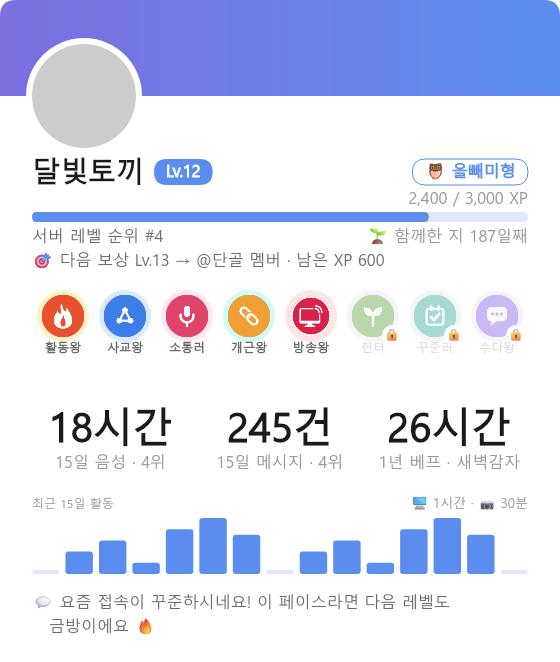
Leave the routine to Onyu
From auto channels to welcoming new members and tidying up inactivity — Onyu handles it
Auto Channel Creation
Join a designated voice channel and Onyu sets up a personal channel for you — then quietly tidies it away when everyone leaves
Joining the designated waiting channel creates a personal channel instantly or via a selection screen. When everyone leaves, Onyu quietly cleans it up.
Welcome New Members
Onyu is the first to greet every new member
Inactive Member Management
Onyu keeps an eye on members who've gone quiet for a while
Admin Assistant
BetaNot sure which setting to use? Ask in plain words and get the right feature and where to set it
“I want to clean up members who haven't joined in a month” → Inactive member classification
How Onyu protects your privacy
No voice recordings
Onyu has no way to listen to or record voice. It only logs when members join or leave voice channels and their mic status.
No message content
Onyu never reads or stores what's written in your chats.
Just activity insights
Stats and reports come from activity records — when members join or leave voice channels and who was there together.

Get started in 3 steps
Onyu needs a little role setup to do its best work
Invite Onyu to Your Server
Click the button below to invite Onyu. Onyu only requests the permissions its features need.
Add to ServerMove the Bot Role to the Top
Features like nickname changes and role management only apply to members below Onyu's role, following Discord's role hierarchy rules.
How to configure
- Go to Server Settings → Roles
- Drag the Onyu role above the roles you want to manage
- Save changes
* The server owner's nickname cannot be changed by any bot
Configure in the Web Dashboard
Log in with your Discord account, then set up auto channels, welcome messages, and more in the dashboard.
Frequently Asked Questions
Is it really free?
Yes, every Onyu feature is currently free. To keep the service running long-term, paid plans may be introduced in the future — core features like voice activity tracking and the basic dashboard will remain free, but some features may gain usage or scope limits. Any changes will be announced in advance.
Why does the bot need these permissions?
Onyu requests only the permissions its features need, and here is what each one is for: View Channels and Connect (tracking voice activity), Manage Channels and Move Members (creating and cleaning up auto voice channels), Send Messages, Embed Links, Attach Files and Read Message History (notices, notifications, and activity card images), Manage Nicknames (game room prefixes), Manage Roles (level, mission, and inactivity roles), and Kick Members (automatic inactive-member cleanup — this only runs when an admin turns it on). The server member list is read through Discord's members intent.
What data does it collect?
Voice and text conversation content is never collected. Only activity metadata such as connection time, channel movement, and participation patterns is recorded.
Does Onyu record voice?
Onyu has no way to listen to or record voice. It only logs when members join or leave voice channels and their mic status.
How long is data retained?
Aggregated activity data is retained for 365 days. Raw voice session records (join/leave timestamps) are deleted after 90 days. If you request deletion, your data is removed immediately regardless of the retention period.
What happens if the bot goes offline?
Voice activity is not recorded while the bot is offline. Recording resumes normally once it's back online, and activity missed during the outage is not retroactively recovered.
How do I remove the bot from my server?
Select Onyu in your Discord server's member list and kick it — it will be removed immediately. After removal, no further activity is recorded, and any previously collected data is handled according to the data retention policy.
Start today, together with Onyu
Invite Onyu now and today's time together starts adding up.
Add to Server